
By Claudine Raschi, MS · Last updated: November 2026
Quick Answer: What Should an Incentive Program Salesforce Integration Do?
A strong incentive program Salesforce integration sends closed deals, accounts and products to the incentive platform and returns earnings and payout status. Ask vendors how they handle triggers, API limits, reversals and security before you sign.
Salesforce holds the deals, accounts and products an incentive program depends on. The harder question is what a vendor’s Salesforce integration does with that data. This post is the technical evaluation layer, and it builds on our general guide to adding incentive programs to CRM systems.
What Does an Incentive Program Salesforce Integration Actually Move?
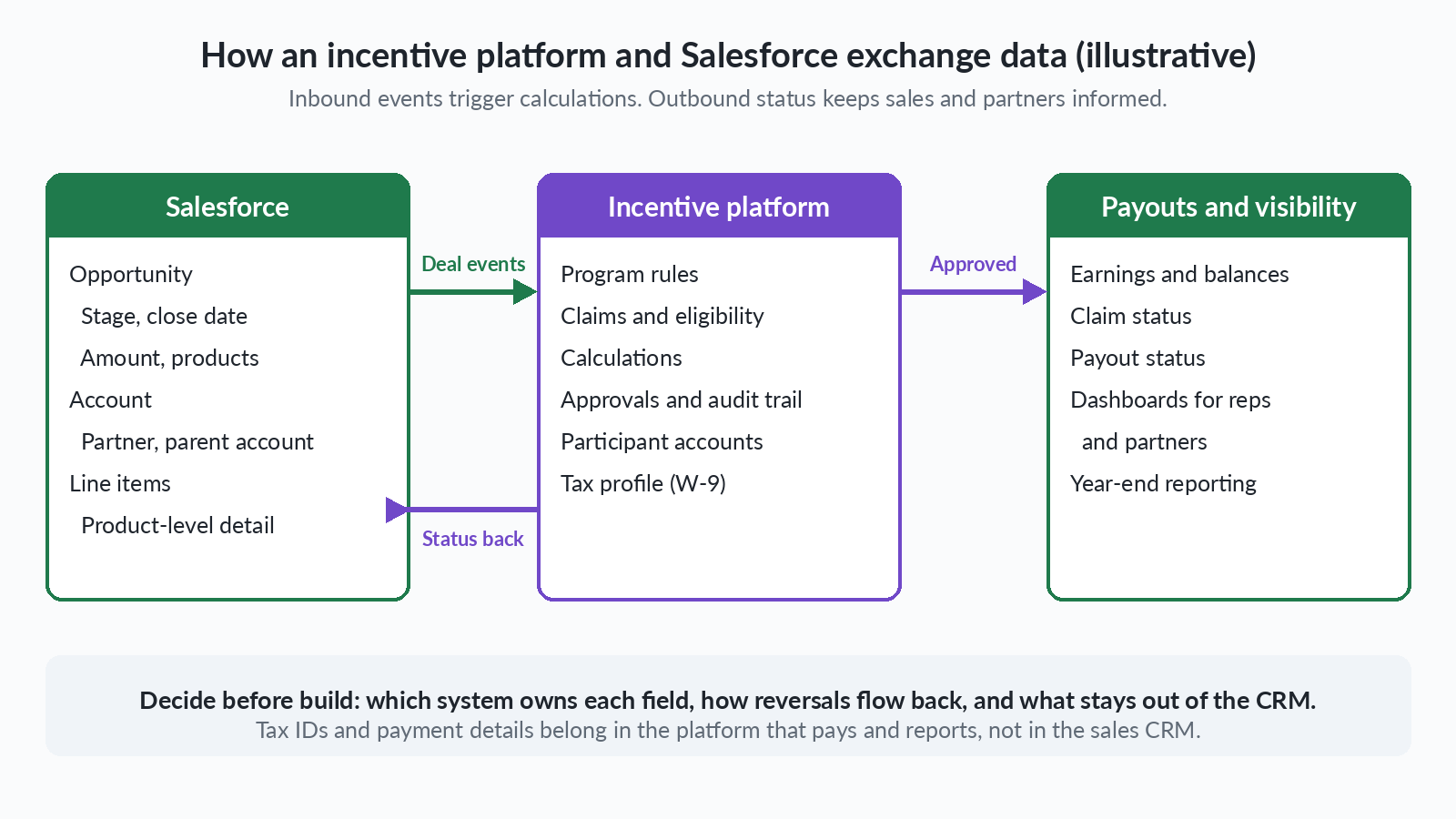
A well-scoped incentive program Salesforce integration carries a small set of records in each direction. Inbound, we expect opportunities, accounts with their hierarchy, and product detail. Outbound, we expect earnings, claim status and payout status, so sellers see results without leaving the CRM.
That split is our reasoning, so confirm how each vendor draws the line. A platform that only reads closed deals is a different product from one that writes earnings back to a custom object. Press for specifics, because scope, pricing and support all follow from them.
Should the Sync Be One-Way or Two-Way?
Two-way works only when each system owns its own fields. Our guidance is to settle field ownership before anyone configures a connector. Salesforce should own commercial facts: stage, close date, products and account relationships. The incentive platform should own incentive facts: eligibility, accrued earnings, approval state and payout status.
A two-way incentive program Salesforce integration works when it writes incentive facts back to clearly labeled fields. It becomes risky when the incentive platform can change commercial data, because one system can silently overwrite the other. Ask for a field ownership matrix and a plain description of what happens when the two disagree.
How Do Salesforce Objects Map to Incentive Events?
Opportunities map to earning events, accounts to hierarchy and line items to product rules, and each has traps. Mapping is where an incentive program Salesforce integration can go wrong. The Salesforce Opportunity object reference and the Salesforce Account object reference describe behaviors that bear directly on payout logic.
Which Opportunity stage should trigger an incentive?
An Opportunity represents a sale or pending deal, and StageName is required and controls several other fields. When it is updated, ForecastCategoryName, IsClosed, IsWon and Probability update automatically based on the stage-category mapping. IsClosed and IsWon cannot be set directly.
The trigger should therefore key off IsWon or a named stage. Confirm which one your admins mapped, because the stage-category mapping decides what counts as won.
Why do Amount and line items matter for product-level rebates?
For opportunities with products, Amount is the sum of the related products, and any attempt to update Amount on such a record is ignored. The update is not rejected, and other fields still update. An integration that writes adjusted amounts to Amount could appear to succeed while changing nothing.
Product-level rebates and SPIFFs should read line items, which must correspond to PricebookEntry records in the opportunity’s price book. Ask who maintains the mapping from price book entries to program product groups. For related background, see our guide to SPIFF program compliance.
Is CloseDate the same as the transaction date?
No. CloseDate is required and is the date the opportunity is expected to close, so it can change as a deal changes. Programs paid on invoice or shipment dates may need a date from another source. Ask whether the platform can accept a transaction date from another source instead of inferring it from CloseDate.
How does an account hierarchy support partner roll-ups?
An Account represents an organization or person involved with your business, such as customers, competitors and partners. Its ParentId relationship field holds the ID of the parent object, which is how hierarchies are expressed.
For distributor and dealer programs, ParentId is the natural path for rolling sub-account volume up for tier calculation. Ask how the platform handles a parent change mid-period, and whether it can use a separate program hierarchy. For related background, see our guide to distributor rebate accrual.
Should Triggers Be Event-Driven, Scheduled or Bulk?
Most programs need all three in an incentive program Salesforce integration. The Salesforce Change Data Capture documentation says Change Data Capture lets you “receive near-real-time changes of Salesforce records, and synchronize corresponding records in an external data store.” It publishes change events for creation, update, deletion and undeletion, and other event types cover special situations such as high loads of changes.
Scheduled syncs suit data that is not urgent, such as nightly account reconciliation. The Salesforce Bulk API 2.0 guide says any data operation with more than 2,000 records is a good candidate for Bulk API 2.0, while smaller jobs should use bulkified synchronous calls in REST, such as Composite, or SOAP.
Ask which pattern the vendor uses for each job. We recommend a scheduled reconciliation even when events are the primary trigger, because it gives you a way to find a missed record.
Will API Limits Affect Your Incentive Program?
They can, and the answer depends on your org. The Salesforce API request limits documentation sets total inbound requests per 24-hour period at 100,000 plus licenses times calls per license, plus purchased add-ons, for Enterprise Edition. The per-license figure is 1,000 for a Salesforce license there, and 5,000 for Unlimited and Performance Editions. The Developer Edition total is 15,000.
Limits depend on edition, licenses and add-ons, so check your own org’s allocation. Because the allocation is per org, we would expect any Salesforce integration for incentive programs to draw on the same total as your other connected tools.
Concurrency matters too. Concurrent inbound requests lasting 20 seconds or longer are limited to 25 for production orgs and sandboxes, and 5 for Developer Edition and trial orgs. Beyond that limit, the API returns a REQUEST_LIMIT_EXCEEDED exception code, and new concurrent requests wait until fewer are running. Ask the vendor:
- How many API calls per day will the integration make at our volume?
- Does it batch requests and prefer bulk jobs for large loads?
- How does it back off after a REQUEST_LIMIT_EXCEEDED response?

How Should Authentication and Security Work?
For a server-to-server incentive program Salesforce integration, ask about the OAuth JWT bearer flow. The Salesforce JWT bearer flow documentation says it lets servers access data “without interactively logging in each time the servers exchange information.” It uses a certificate to sign the request and needs no explicit user interaction, but it does require prior approval of the client app.
Our guidance is to use a dedicated integration user with least-privilege permissions and review that access on a schedule. Ask who holds the certificate and how it is rotated.
Participants are a separate question. Ask whether participants view earnings in the incentive platform, and whether it supports single sign-on through SAML 2.0 with your identity provider.
What Happens When a Deal Is Reversed or Corrected?
A reversal should reverse or hold earnings, and that is where a weak incentive program Salesforce integration fails. A deal that moves back from a won stage, a deleted record and an undeleted record each change what a participant should be paid. Change Data Capture publishes change events for creation, update, deletion and undeletion, so these changes are candidates for event-driven handling. Ask how the vendor confirms none were missed.
Our guidance: a move away from a won stage should reverse or hold accrued earnings, a deletion should flag the payout for review instead of erasing history, and an undeletion should restore the original calculation without a duplicate. Because StageName drives IsWon, a stage correction can change eligibility even though no one set a won flag directly.
Keep an audit trail of every calculation change so a reviewer can trace a payout to the record that caused it. Payouts already made need a rule too, such as an offset against future earnings. See also our guides to the sales commission reconciliation process and channel incentive program audits.
What Should Stay Out of Salesforce?
A secure incentive platform Salesforce integration keeps payee tax identity and payment details out of the CRM. The IRS Form W-9 instructions say Form W-9 is used by persons required to file information returns to get the payee’s correct name and taxpayer identification number. In our view, the party that pays and reports should collect it, not the sales team in the CRM.
The IRS 1099-NEC instructions say payee statements must be furnished and filed with the IRS by January 31. For tax years beginning after 2025 the reporting threshold for certain payments rose to $2,000 and may be adjusted for inflation beginning in calendar year 2027. Confirm the treatment of your own program with a tax advisor.
How Should You Test Before Go-Live?
Test any Salesforce incentive integration in a sandbox first, then run the new calculation alongside your current process for at least one full program period. Our guidance is to compare results record by record and resolve every difference before you switch. Write down the plan rules beforehand, including credit splits, clawbacks, caps and effective dates, because a test can only prove what has been documented.
Include edge cases such as a deal reversed after payout, a duplicate event, a parent account change mid-period and a peak-volume load at quarter end. Define what calculated, approved, released for payment and paid mean, and decide how approved payouts reach payroll, your ERP or your payment provider.
What Data Cleanup Should Happen Before Go-Live?
Automation amplifies whatever is in the CRM. Duplicate accounts split volume and distort tiers, inconsistent hierarchies send roll-ups to the wrong parent, and unmapped products leave line items with no rule. That is our reasoning, not a sourced finding. A Salesforce integration for incentive programs is only as accurate as these inputs.
One Level 6 client, a jewelry brand, shows why the data foundation comes first. It approved claims in a spreadsheet and mailed paper checks quarterly. In the move to a platform, reps were uploaded with completed profiles and W-9 information, and historical submissions were loaded.
The brand now pays monthly by reloadable debit card, and we handle its US 1099 forms, which it had previously overlooked. This example is not presented as a Salesforce project, but the lesson holds: settle participants, tax profiles and history before you automate triggers.
What Questions Should You Ask Every Vendor Before You Sign?
Score every vendor against the eleven questions below, in demos and in the RFP. We call it the integration evaluation checklist, and it keeps any incentive program Salesforce integration comparison consistent. For a formal evaluation, see our rebate vendor RFP guide.
| Question | Why it matters | What a good answer looks like |
|---|---|---|
| Which Salesforce objects and fields do you read and write? | Scope drives permissions, pricing and risk. | A written list of objects and fields, marked read or write, with a field ownership matrix. |
| What event triggers a calculation? | Stage logic decides when money is earned. | Configurable on IsWon or a named stage, tested against your stage mapping. |
| How do you handle Amount and line items? | Amount updates are ignored on records with products. | Reads line items and price book entries, and never relies on writing Amount. |
| Which date sets the program period? | CloseDate is only the expected close. | Accepts a transaction date from another source, with a documented rule. |
| Do you use events, scheduled syncs and bulk loads? | Each pattern fits a different job. | Events for prompt updates, bulk loads for large volumes, and scheduled reconciliation to catch gaps. |
| How many API calls will you make, and how do you handle limits? | The allocation is per org, so confirm what else draws on it. | A volume-based estimate, batching, limits on long-running concurrent requests, and a usage cap. |
| How do you authenticate, and with what access? | Integration access is a security exposure. | Certificate-based server flow, a least-privilege integration user, rotation, and SAML 2.0 SSO for participants. |
| What happens on reversals, deletions and undeletions? | Payouts must follow the record, not just the first event. | Documented rules, an audit trail, and offsets against payouts already made. |
| Where are W-9s and payment details held, and who files 1099s? | Tax identity should not live in sales records. | Held by the paying party outside the CRM, with clear filing responsibility. |
| Is the integration installed inside our Salesforce org or connected from outside by API, and who maintains it? | Where it runs affects access, upgrades and support. | A clear statement of where it runs, who updates it, and what access it needs. |
| How do you treat account hierarchies and duplicates? | Roll-ups and tiers depend on clean parents. | Honors ParentId, supports a separate program hierarchy, and flags likely duplicates. |
What Does Level 6 Offer for Salesforce-Connected Programs?
Our about page describes fully managed incentive solutions “since 2005.” On our incentive compensation management page, we describe an “API-first architecture” and a “bi-directional integration framework” that connects CRM, ERP, payroll and HRIS platforms, and we say our Salesforce commission integration can “automate commission calculations instantly when opportunities close or revenue milestones are achieved.”
On our rebate programs page, we describe a Salesforce rebate integration that can “capture deal registration, opportunity data, and customer purchase history to automatically validate rebate eligibility and trigger claim processing.” For sales teams, see our sales incentive programs page.
Our channel incentive programs page says “Our standard deployment runs 4 weeks from signed agreement to live program, including participant portal, admin dashboard, fulfillment integration, and tax/year-end reporting setup.” That figure is for a standard channel program deployment, not a Salesforce integration, so confirm integration scope and timing during scoping.
When Is a File-Based Feed Enough?
Sometimes a scheduled file is the right integration. If your program pays quarterly, uses a handful of fields, and does not need real-time visibility, a regular export of closed-won deals with account ID, product, amount and transaction date can work. It also gives you a controlled checkpoint while CRM clean-up is under way.
Move to an API or event-based design when volumes grow or reversals become frequent. For rollout planning, see our ICM implementation guide and our guide to a digital rebate program for manufacturers, or browse our incentive program solutions.
Frequently Asked Questions
What is an incentive program Salesforce integration?
An incentive program Salesforce integration is a connection that sends deals, accounts and products from Salesforce to an incentive platform and returns earnings, claim status and payout status. It lets the platform calculate and track incentives from CRM data without manual re-entry. The quality of the integration depends on object mapping, trigger design, reversal handling and security.
Should an incentive trigger on a closed won opportunity?
Often yes, but confirm what closed won means in your org. In Salesforce, StageName controls IsClosed and IsWon, and those two fields cannot be set directly. Tie the trigger to IsWon or a named stage, then test what happens when a stage moves back. Programs paid on invoice or shipment may need a different trigger.
Do Salesforce API limits matter for an incentive platform?
Yes, because the allocation is per org, so we would expect the platform to draw on the same daily total of inbound API requests as your other connected tools. Limits depend on edition, licenses and purchased add-ons, so check your own org’s allocation. Ask the vendor to estimate daily calls at your volume, batch requests where possible, and avoid long-running concurrent requests, which return REQUEST_LIMIT_EXCEEDED beyond the limit.
How should an incentive platform authenticate to Salesforce?
Server-to-server integrations can use the OAuth JWT bearer flow, which uses a certificate to sign the request and needs no interactive login, but requires prior approval of the client app. Pair it with a dedicated, least-privilege integration user. For participants, ask for single sign-on through SAML 2.0 with your identity provider.
Should W-9 information be stored in Salesforce?
In our view, no. Payee tax identity is collected by the party that pays and reports, not by the sales team in the CRM. Keep W-9 data and payment details in the platform or paying system, and confirm how your own program is treated with a tax advisor.
How long does a Salesforce integration for incentives take?
It depends on scope, so ask for a written plan during scoping. The plan should cover object mapping, sandbox testing, a parallel run and go-live dates. Data cleanup before go-live can add time, so ask who owns it. Level 6 states a standard channel program deployment runs 4 weeks, which is a different scope from an integration.
How do you track incentives in Salesforce?
Keep commercial facts such as stage, close date and products in Salesforce, and keep incentive facts such as earnings, approval state and payout status in the incentive platform. Then write results back to clearly labeled fields so sellers can see them in the CRM. Confirm which objects and fields the vendor reads and writes.
Should the integration run inside Salesforce or connect from outside?
Ask where the integration runs, who maintains it and what access it needs. Then ask how an app installed in your org, such as a managed package, and an external platform connected by API each handle permissions, upgrades, API usage and support.
Final Takeaways
- Define what your incentive program Salesforce integration moves in each direction and who owns every field before configuring a connector.
- Key triggers to IsWon or a named stage, read line items for product-level rules, and treat CloseDate as an expectation.
- Check your org’s API allocation, and ask how the vendor batches, backs off and caps usage.
- Use a certificate-based server flow with a least-privilege user, and keep W-9 data out of the CRM.
- Require documented rules for reversals, deletions and undeletions before you sign.
If you are comparing platforms and want to test your setup against these questions, contact Level 6 to discuss how these questions apply to your Salesforce integration for incentive programs.